If you want to connect a domain that is being managed through IP.GR with Zoho by adding the proper DNS records, you can activate the free service DNS control of your domain, by following the steps below:
- Log into your IP.GR account.
- Click "Dashboard"" and next to the Domains category press My domain names.
- Find the desired domain and press "Edit" on its right.
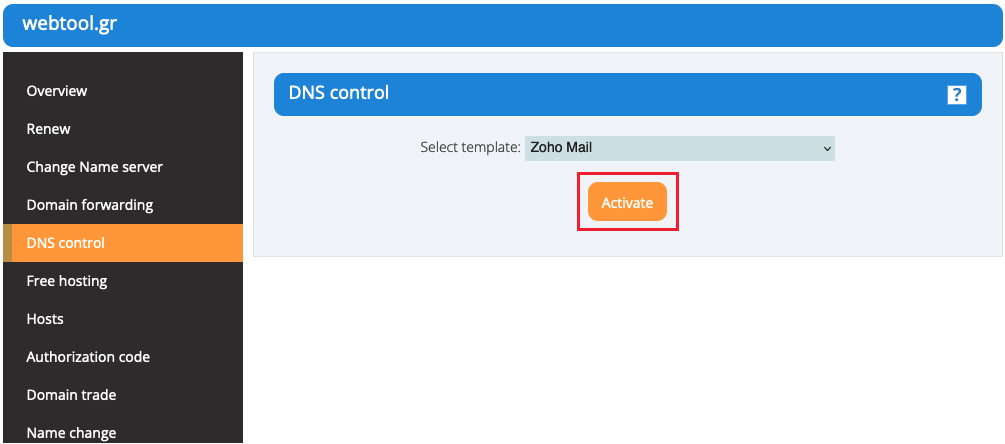
- From the side menu on the left, navigate to DNS control, select from the drop-down list the "Zoho" template and click Activate.
- Upon the activation of the DNS control service, the nameservers of the domain will be changed to ns1.server40.net and ns2.server40.net. If you are sure that you want the nameservers of your domain to be changed, (given that they haven't already been changed), press OK.
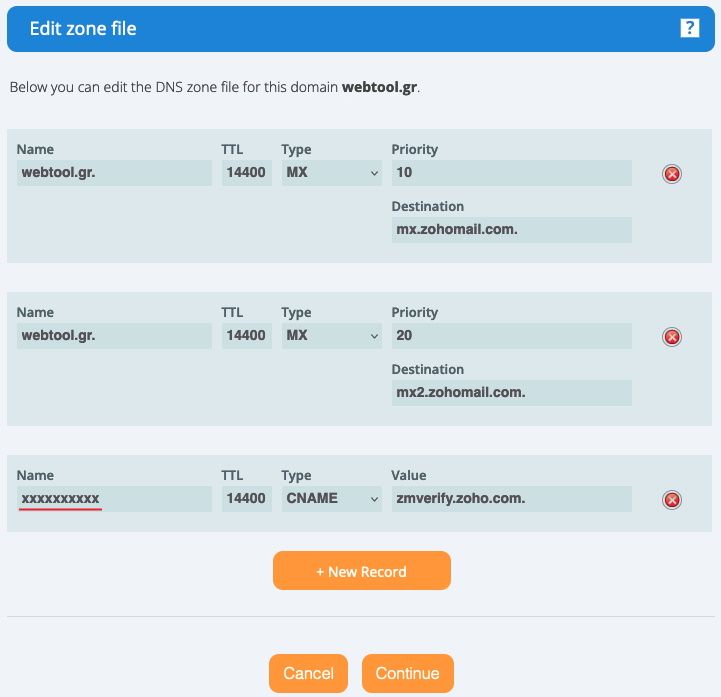
- Click the Zone editor button in order to view the DNS records that have been set to your domain.
- In the last record you have to add the name that you will get from Zoho. In case you need to add another record, click the + New Record button.